> For the complete documentation index, see [llms.txt](https://themessupport.gitbook.io/lollipop-theme/llms.txt). Markdown versions of documentation pages are available by appending `.md` to page URLs; this page is available as [Markdown](https://themessupport.gitbook.io/lollipop-theme/global/theme-settings.md).

# Theme settings

Upload your store logo and favicon used throughout your storefront.

## How to access

1. **Go to** Shopify Admin → Online Store → Themes.
2. **Click** Customize on your active theme.
3. Click **Theme settings** → **Logo**.

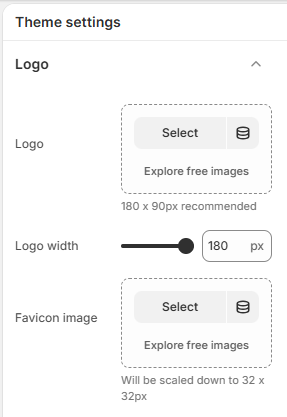
## Logo

<figure><img src="https://1040996881-files.gitbook.io/~/files/v0/b/gitbook-x-prod.appspot.com/o/spaces%2F8OiMl9SqYX9uxagJM84a%2Fuploads%2Fgit-blob-3ab8d3cf61c465a3c7d8c19042a657916095257a%2FScreenshot_134.png?alt=media" alt=""><figcaption></figcaption></figure>

| Setting       | Description                                             |
| ------------- | ------------------------------------------------------- |
| Logo          | Selects the logo image displayed throughout your store. |
| Logo width    | Sets the display width of the logo in pixels.           |
| Favicon image | Selects the favicon displayed in the browser tab.       |

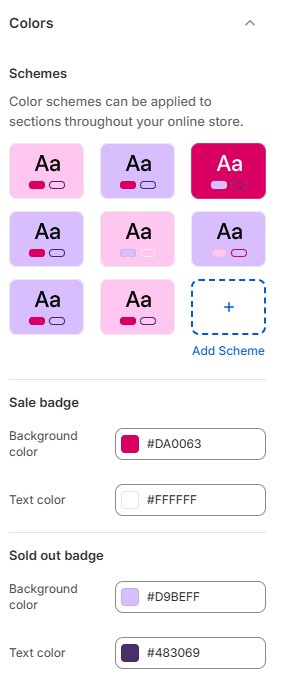
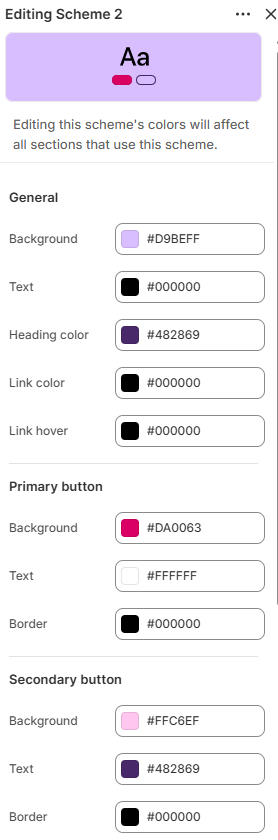
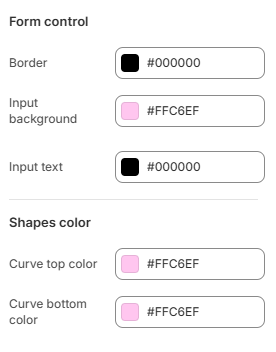
## Colors

<div><figure><img src="https://1040996881-files.gitbook.io/~/files/v0/b/gitbook-x-prod.appspot.com/o/spaces%2F8OiMl9SqYX9uxagJM84a%2Fuploads%2Fgit-blob-382233791498736b211cfe415b55f1a432fed978%2FScreenshot_135.png?alt=media" alt=""><figcaption></figcaption></figure> <figure><img src="https://1040996881-files.gitbook.io/~/files/v0/b/gitbook-x-prod.appspot.com/o/spaces%2F8OiMl9SqYX9uxagJM84a%2Fuploads%2Fgit-blob-e3ed1ce862f3a861f7e0ff621e75cf6c013523d9%2FScreenshot_136.png?alt=media" alt=""><figcaption></figcaption></figure> <figure><img src="https://1040996881-files.gitbook.io/~/files/v0/b/gitbook-x-prod.appspot.com/o/spaces%2F8OiMl9SqYX9uxagJM84a%2Fuploads%2Fgit-blob-5dd3ad0b69c29586107b31a45a8fae005dc5a6c8%2FScreenshot_137.png?alt=media" alt=""><figcaption></figcaption></figure></div>

| Setting          | Description                                              |
| ---------------- | -------------------------------------------------------- |
| Schemes          |                                                          |
| Color schemes    | Manage the color schemes available throughout the theme. |
| Sale badge       |                                                          |
| Background color | Sets the background color of the sale badge.             |
| Text color       | Sets the text color of the sale badge.                   |
| Sold out badge   |                                                          |
| Background color | Sets the background color of the sold out badge.         |
| Text color       | Sets the text color of the sold out badge.               |

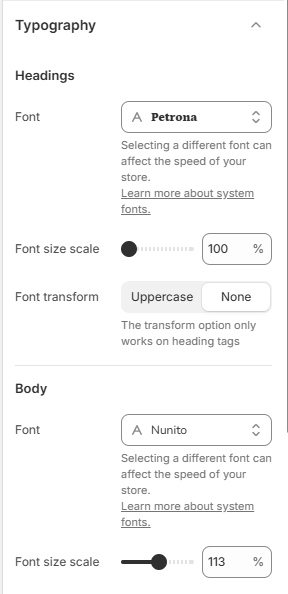
## Typography

<figure><img src="https://1040996881-files.gitbook.io/~/files/v0/b/gitbook-x-prod.appspot.com/o/spaces%2F8OiMl9SqYX9uxagJM84a%2Fuploads%2Fgit-blob-eb55bd6a3514eeaaab46aeb8e2cd7fead514d195%2FScreenshot_138.png?alt=media" alt=""><figcaption></figcaption></figure>

| Setting         | Description                                                 |
| --------------- | ----------------------------------------------------------- |
| Headings        |                                                             |
| Font            | Selects the font used for headings.                         |
| Font size scale | Adjusts the heading font size throughout the theme.         |
| Font transform  | Sets the heading text style. Choose from Uppercase or None. |
| Body            |                                                             |
| Font            | Selects the font used for body text.                        |
| Font size scale | Adjusts the body font size throughout the theme.            |

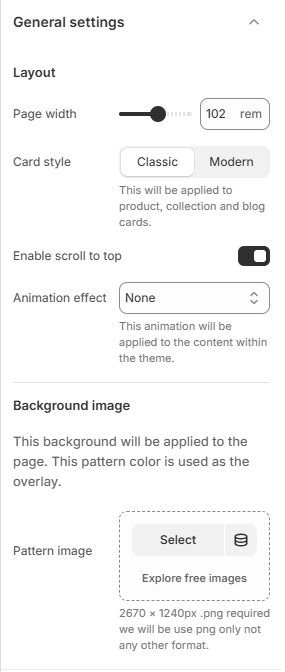
## General settings

<figure><img src="https://1040996881-files.gitbook.io/~/files/v0/b/gitbook-x-prod.appspot.com/o/spaces%2F8OiMl9SqYX9uxagJM84a%2Fuploads%2Fgit-blob-5cd125d7022f674b2da3a80eeadfeb8f3e1ea1e0%2FScreenshot_139.png?alt=media" alt=""><figcaption></figcaption></figure>

| Setting              | Description                                                                           |
| -------------------- | ------------------------------------------------------------------------------------- |
| Layout               |                                                                                       |
| Page width           | Sets the maximum width of the page content.                                           |
| Card style           | Sets the style of product, collection, and blog cards. Choose from Classic or Modern. |
| Enable scroll to top | Shows a button that scrolls the page back to the top.                                 |
| Animation effect     | Sets the animation effect used for theme content.                                     |
| Background image     |                                                                                       |
| Pattern image        | Selects a background pattern image for the page.                                      |

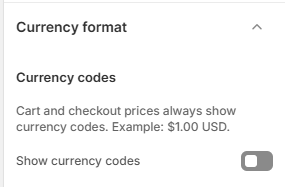
## Currency format

<figure><img src="https://1040996881-files.gitbook.io/~/files/v0/b/gitbook-x-prod.appspot.com/o/spaces%2F8OiMl9SqYX9uxagJM84a%2Fuploads%2Fgit-blob-2171cdda7c68de1fa9b75d6d5a325bb4ad6359f5%2FScreenshot_141.png?alt=media" alt=""><figcaption></figcaption></figure>

| Setting             | Description                                               |
| ------------------- | --------------------------------------------------------- |
| Show currency codes | Displays currency codes with prices throughout the store. |

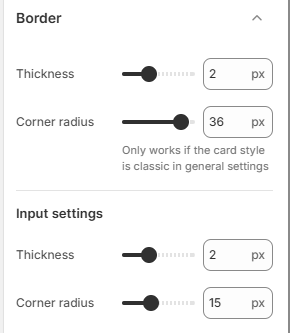
## Border

<figure><img src="https://1040996881-files.gitbook.io/~/files/v0/b/gitbook-x-prod.appspot.com/o/spaces%2F8OiMl9SqYX9uxagJM84a%2Fuploads%2Fgit-blob-f5f91486570560f8dc75201820957ccbfe286197%2FScreenshot_142.png?alt=media" alt=""><figcaption></figcaption></figure>

| Setting        | Description                                             |
| -------------- | ------------------------------------------------------- |
| Thickness      | Sets the thickness of borders throughout the theme.     |
| Corner radius  | Controls the roundness of corners throughout the theme. |
| Input settings |                                                         |
| Thickness      | Sets the border thickness for input fields.             |
| Corner radius  | Controls the roundness of input field corners.          |

{% hint style="info" %}
The border thickness and corner radius settings in the first section apply only when the **Classic** card style is selected in **Theme settings → General settings**.
{% endhint %}

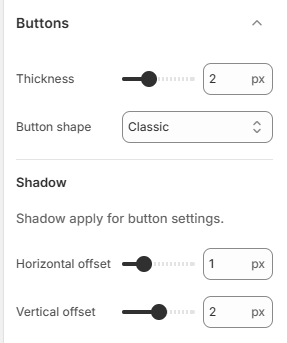
## Buttons

<figure><img src="https://1040996881-files.gitbook.io/~/files/v0/b/gitbook-x-prod.appspot.com/o/spaces%2F8OiMl9SqYX9uxagJM84a%2Fuploads%2Fgit-blob-62c93136af92c3158079165713cd7db8cbed348b%2FScreenshot_143.png?alt=media" alt=""><figcaption></figcaption></figure>

| Setting           | Description                                                     |
| ----------------- | --------------------------------------------------------------- |
| Thickness         | Sets the border thickness of buttons.                           |
| Button shape      | Sets the button shape. Choose from Classic, Modern, or Default. |
| Shadow            |                                                                 |
| Horizontal offset | Sets the horizontal position of the button shadow.              |
| Vertical offset   | Sets the vertical position of the button shadow.                |

{% hint style="info" %}
Shadow settings apply only to buttons not for the links.
{% endhint %}

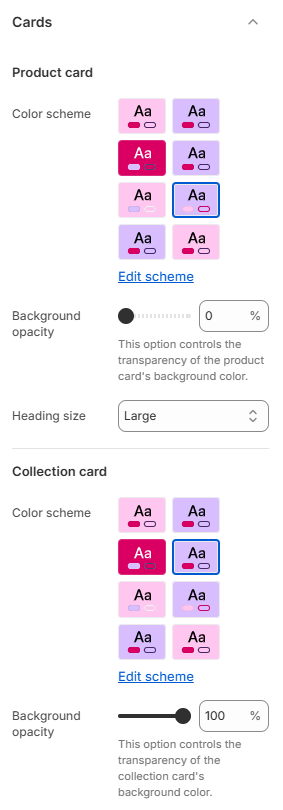
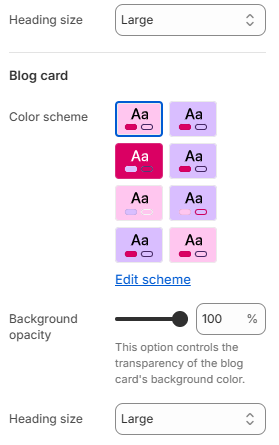
## Cards

<div><figure><img src="https://1040996881-files.gitbook.io/~/files/v0/b/gitbook-x-prod.appspot.com/o/spaces%2F8OiMl9SqYX9uxagJM84a%2Fuploads%2Fgit-blob-5272865a39ae9d82e3d9d1724e5941dfac6222e4%2FScreenshot_144.png?alt=media" alt=""><figcaption></figcaption></figure> <figure><img src="https://1040996881-files.gitbook.io/~/files/v0/b/gitbook-x-prod.appspot.com/o/spaces%2F8OiMl9SqYX9uxagJM84a%2Fuploads%2Fgit-blob-7fb82b4c5f68cf9c4c4b943a781a57c0e56238e3%2FScreenshot_145.png?alt=media" alt=""><figcaption></figcaption></figure></div>

| Setting            | Description                                                  |
| ------------------ | ------------------------------------------------------------ |
| Product card       |                                                              |
| Color scheme       | Sets the background and text colors of product cards.        |
| Background opacity | Controls the transparency of the product card background.    |
| Heading size       | Sets the size of product card headings.                      |
| Collection card    |                                                              |
| Color scheme       | Sets the background and text colors of collection cards.     |
| Background opacity | Controls the transparency of the collection card background. |
| Heading size       | Sets the size of collection card headings.                   |
| Blog card          |                                                              |
| Color scheme       | Sets the background and text colors of blog cards.           |
| Background opacity | Controls the transparency of the blog card background.       |
| Heading size       | Sets the size of blog card headings.                         |

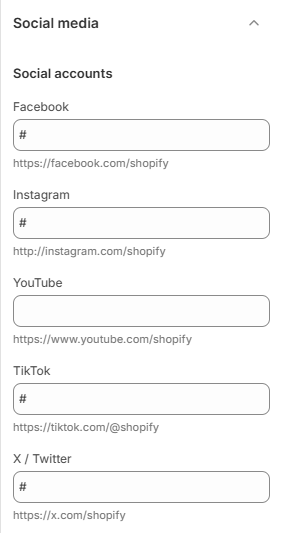
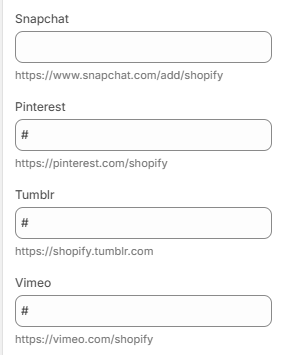
## Social media

<div><figure><img src="https://1040996881-files.gitbook.io/~/files/v0/b/gitbook-x-prod.appspot.com/o/spaces%2F8OiMl9SqYX9uxagJM84a%2Fuploads%2Fgit-blob-a9ee389d1650d94a9d65c3bfbb521d8ca8878636%2FScreenshot_147.png?alt=media" alt=""><figcaption></figcaption></figure> <figure><img src="https://1040996881-files.gitbook.io/~/files/v0/b/gitbook-x-prod.appspot.com/o/spaces%2F8OiMl9SqYX9uxagJM84a%2Fuploads%2Fgit-blob-2ea5c7ea72cb0713200208732e072feeb9a65d05%2FScreenshot_148.png?alt=media" alt=""><figcaption></figcaption></figure></div>

| Setting         | Description                                  |
| --------------- | -------------------------------------------- |
| Social accounts |                                              |
| Facebook        | Adds your Facebook profile or page link.     |
| Instagram       | Adds your Instagram profile link.            |
| YouTube         | Adds your YouTube channel link.              |
| TikTok          | Adds your TikTok profile link.               |
| X / Twitter     | Adds your X (formerly Twitter) profile link. |
| Snapchat        | Adds your Snapchat profile link.             |
| Pinterest       | Adds your Pinterest profile link.            |
| Tumblr          | Adds your Tumblr profile link.               |
| Vimeo           | Adds your Vimeo profile or channel link.     |

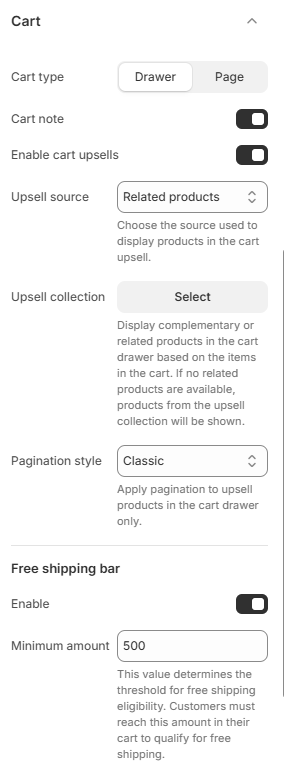
## Cart

<figure><img src="https://1040996881-files.gitbook.io/~/files/v0/b/gitbook-x-prod.appspot.com/o/spaces%2F8OiMl9SqYX9uxagJM84a%2Fuploads%2Fgit-blob-45421303ef022c6c676b7f01a78990f0a8355dd1%2FScreenshot_149.png?alt=media" alt=""><figcaption></figcaption></figure>

| Setting             | Description                                                          |
| ------------------- | -------------------------------------------------------------------- |
| Cart type           | Sets how the cart is displayed. Choose from Drawer or Page.          |
| Cart note           | Allows customers to add a note to their order.                       |
| Enable cart upsells | Displays product recommendations in the cart.                        |
| Upsell source       | Sets the source used to display cart upsell products.                |
| Upsell collection   | Selects the collection used for cart upsell products.                |
| Pagination style    | Sets the pagination style for cart upsell products.                  |
| Free shipping bar   |                                                                      |
| Enable              | Displays a free shipping progress bar in the cart.                   |
| Minimum amount      | Sets the minimum order amount required to qualify for free shipping. |

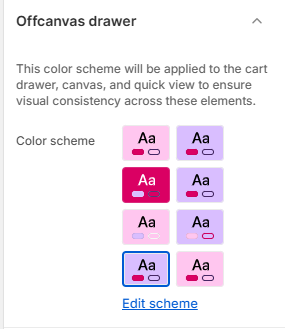
## Offcanvas drawer

<figure><img src="https://1040996881-files.gitbook.io/~/files/v0/b/gitbook-x-prod.appspot.com/o/spaces%2F8OiMl9SqYX9uxagJM84a%2Fuploads%2Fgit-blob-c1cd41a91e60269535fdaa89043391718de3e6ad%2FScreenshot_150.png?alt=media" alt=""><figcaption></figcaption></figure>

| Setting      | Description                                                                      |
| ------------ | -------------------------------------------------------------------------------- |
| Color scheme | Sets the background and text colors for the cart drawer, canvas, and quick view. |

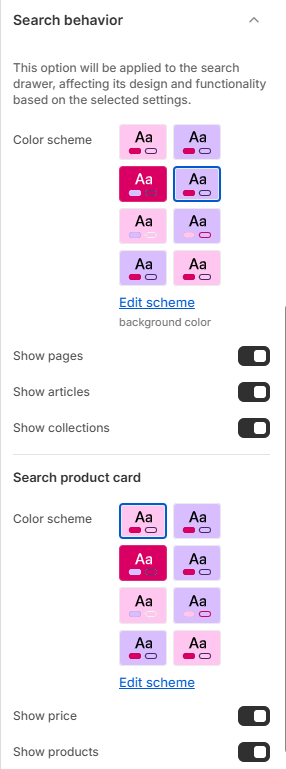
## Search behavior

<figure><img src="https://1040996881-files.gitbook.io/~/files/v0/b/gitbook-x-prod.appspot.com/o/spaces%2F8OiMl9SqYX9uxagJM84a%2Fuploads%2Fgit-blob-cbb716545b5d63150a449d9d4c0f4016ed5ec65f%2FScreenshot_151.png?alt=media" alt=""><figcaption></figcaption></figure>

| Setting             | Description                                                                        |
| ------------------- | ---------------------------------------------------------------------------------- |
| Color scheme        | Sets the background and text colors for the search drawer.                         |
| Show pages          | Includes pages in search results.                                                  |
| Show articles       | Includes blog articles in search results.                                          |
| Show collections    | Includes collections in search results.                                            |
| Search product card |                                                                                    |
| Color scheme        | Sets the background and text colors for product cards displayed in search results. |
| Show price          | Displays product prices in search results.                                         |
| Show products       | Displays product results in the search drawer.                                     |

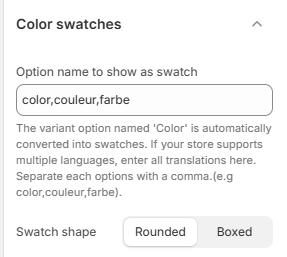
## Color swatches

<figure><img src="https://1040996881-files.gitbook.io/~/files/v0/b/gitbook-x-prod.appspot.com/o/spaces%2F8OiMl9SqYX9uxagJM84a%2Fuploads%2Fgit-blob-2ce2dd06ad3379f06e43b2e927282e025b4f9c17%2FScreenshot_152.png?alt=media" alt=""><figcaption></figcaption></figure>

| Setting                       | Description                                                                                                                 |
| ----------------------------- | --------------------------------------------------------------------------------------------------------------------------- |
| Option name to show as swatch | Specifies the product option names that should be displayed as color swatches. Separate multiple option names with a comma. |
| Swatch shape                  | Sets the swatch shape. Choose from Rounded or Boxed.                                                                        |

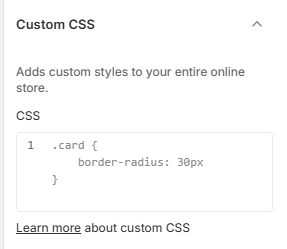
## Custom CSS

<figure><img src="https://1040996881-files.gitbook.io/~/files/v0/b/gitbook-x-prod.appspot.com/o/spaces%2F8OiMl9SqYX9uxagJM84a%2Fuploads%2Fgit-blob-a648b91a08ba2128ae3c99ab02f3440d97d6c63b%2FScreenshot_153.png?alt=media" alt=""><figcaption></figcaption></figure>

| Setting | Description                                                      |
| ------- | ---------------------------------------------------------------- |
| CSS     | Adds custom CSS that is applied across your entire online store. |