> For the complete documentation index, see [llms.txt](https://themessupport.gitbook.io/lollipop-theme/llms.txt). Markdown versions of documentation pages are available by appending `.md` to page URLs; this page is available as [Markdown](https://themessupport.gitbook.io/lollipop-theme/sections/frequently-asked-questions.md).
# Frequently asked questions
Display a list of expandable questions and answers to help customers quickly find information.
## How to access
1. **Go to** Shopify Admin → Online Store → Themes.
2. **Click** Customize on your active theme.
3. Click **Add section** and choose **Frequently asked questions**..
## Section Settings
| Setting | Description |
| -------------------------- | ------------------------------------------------------------------------------------------------------------------------------------------- |
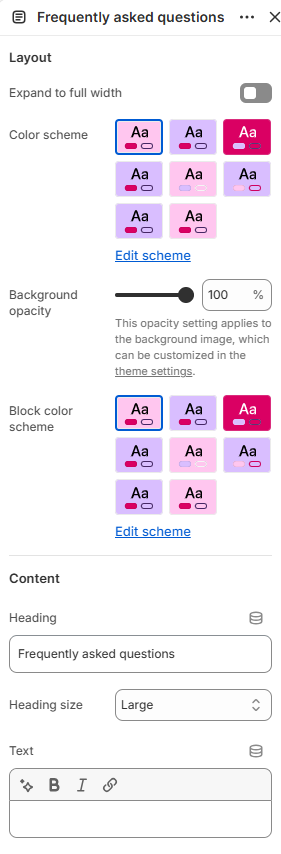
| Layout | |
| Expand to full width | Extends the section to the full browser width. |
| Color scheme | Sets the background and text colors. |
| Background opacity | Controls the background opacity. |
| Block color scheme | Sets the background and text colors for the collapsible rows. |
| Content | |
| Heading | Sets the section heading. |
| Heading size | Controls the size of the heading. Choose from Small, Medium, or Large. |
| Text | Adds supporting text to the section. |
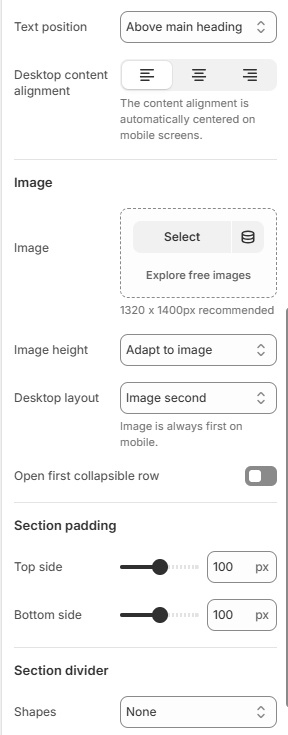
| Text position | Shows the text above or below the heading. |
| Desktop content alignment | Aligns the section content on desktop. Choose from Left, Center, or Right. On mobile, the content is automatically centered. |
| Image | |
| Image | Selects an image to display alongside the FAQ content. |
| Image height | Sets the image height. Choose from Adapt to image, Small, Medium, or Large. |
| Desktop layout | Sets the image position on desktop. Choose from Image first or Image second. On mobile, the image is always displayed first. |
| Open first collapsible row | Automatically expands the first collapsible row when the section loads. |
| Section padding | |
| Top side | Space above the section. |
| Bottom side | Space below the section. |
| Section divider | |
| Shapes | Adds a decorative divider to the section. Choose from Curve top, Curve bottom, Curve both, None, Border top, Border bottom, or Both border. |
## Blocks
Add blocks to this section in the theme editor. Each block is a separate item you can add, remove, and reorder.
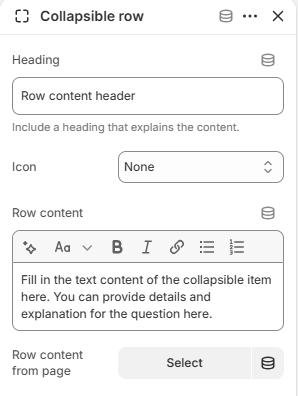
### Collapsible row
Displays a question with expandable content.
| Setting | Description |
| --------------------- | ----------------------------------------------------------------- |
| Heading | Sets the question displayed in the collapsible row. |
| Icon | Displays an icon before the heading. |
| Row content | Adds the content displayed when the row is expanded. |
| Row content from page | Selects a page whose content is displayed in the collapsible row. |