> For the complete documentation index, see [llms.txt](https://themessupport.gitbook.io/lollipop-theme/llms.txt). Markdown versions of documentation pages are available by appending `.md` to page URLs; this page is available as [Markdown](https://themessupport.gitbook.io/lollipop-theme/sections/newsletter.md).

# Newsletter

Collect customer email subscriptions by displaying a newsletter signup form.

## How to access

1. **Go to** Shopify Admin → Online Store → Themes.
2. **Click** Customize on your active theme.
3. Click **Add section** and choose **Newsletter**.

## Section Settings

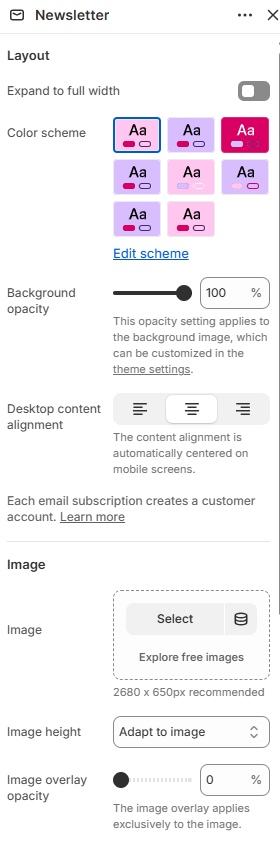
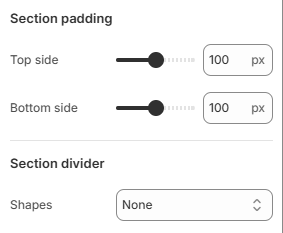
<div><figure><img src="https://1040996881-files.gitbook.io/~/files/v0/b/gitbook-x-prod.appspot.com/o/spaces%2F8OiMl9SqYX9uxagJM84a%2Fuploads%2Fgit-blob-6302d3cf128b3c1e76c194a87077d2c2a34b4de5%2FScreenshot_62.png?alt=media" alt=""><figcaption></figcaption></figure> <figure><img src="https://1040996881-files.gitbook.io/~/files/v0/b/gitbook-x-prod.appspot.com/o/spaces%2F8OiMl9SqYX9uxagJM84a%2Fuploads%2Fgit-blob-eaa248b130219b9feeab234438f73b6fb7ba4e54%2FScreenshot_63.png?alt=media" alt=""><figcaption></figcaption></figure></div>

| Setting                   | Description                                                                                                                                 |
| ------------------------- | ------------------------------------------------------------------------------------------------------------------------------------------- |
| Layout                    |                                                                                                                                             |
| Expand to full width      | Extends the section to the full browser width.                                                                                              |
| Color scheme              | Sets the background and text colors.                                                                                                        |
| Background opacity        | Controls the background opacity.                                                                                                            |
| Desktop content alignment | Aligns the section content on desktop. Choose from Left, Center, or Right. On mobile, the content is automatically centered.                |
| Image                     |                                                                                                                                             |
| Image                     | Selects an image displayed with the newsletter section.                                                                                     |
| Image height              | Sets the image height. Choose from Adapt to image, Small, Medium, or Large.                                                                 |
| Image overlay opacity     | Controls the image overlay opacity.                                                                                                         |
| Section padding           |                                                                                                                                             |
| Top side                  | Space above the section.                                                                                                                    |
| Bottom side               | Space below the section.                                                                                                                    |
| Section divider           |                                                                                                                                             |
| Shapes                    | Adds a decorative divider to the section. Choose from Curve top, Curve bottom, Curve both, None, Border top, Border bottom, or Both border. |

## Blocks

Add blocks to this section in the theme editor. Each block is a separate item you can add, remove, and reorder.

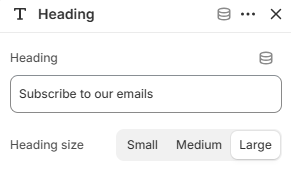
### Heading

Displays the newsletter heading.

<figure><img src="https://1040996881-files.gitbook.io/~/files/v0/b/gitbook-x-prod.appspot.com/o/spaces%2F8OiMl9SqYX9uxagJM84a%2Fuploads%2Fgit-blob-d9ffda77f39f1833c7492c60a3835d60bb65a23a%2FScreenshot_64.png?alt=media" alt=""><figcaption></figcaption></figure>

| Setting | Description            |
| ------- | ---------------------- |
| Heading | Sets the heading text. |

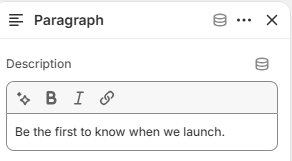
### Paragraph

Displays supporting text below the heading.

<figure><img src="https://1040996881-files.gitbook.io/~/files/v0/b/gitbook-x-prod.appspot.com/o/spaces%2F8OiMl9SqYX9uxagJM84a%2Fuploads%2Fgit-blob-44bb4d27b71cf40802f7104055ad5a92bbf2c2db%2FScreenshot_65.png?alt=media" alt=""><figcaption></figcaption></figure>

| Setting | Description                             |
| ------- | --------------------------------------- |
| Text    | Adds supporting text below the heading. |

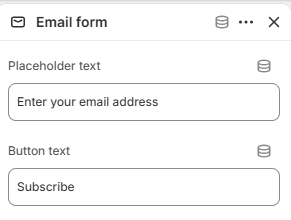
### Email form

Displays the email subscription form.

<figure><img src="https://1040996881-files.gitbook.io/~/files/v0/b/gitbook-x-prod.appspot.com/o/spaces%2F8OiMl9SqYX9uxagJM84a%2Fuploads%2Fgit-blob-97a400166e2b09e01f8d75ac917bd62a295a8ace%2FScreenshot_66.png?alt=media" alt=""><figcaption></figcaption></figure>

| Setting     | Description                                                                                      |
| ----------- | ------------------------------------------------------------------------------------------------ |
| No settings | This block displays the newsletter email signup form and does not include configurable settings. |