> For the complete documentation index, see [llms.txt](https://themessupport.gitbook.io/lollipop-theme/llms.txt). Markdown versions of documentation pages are available by appending `.md` to page URLs; this page is available as [Markdown](https://themessupport.gitbook.io/lollipop-theme/sections/scrolling-products.md).
# Scrolling products
Display a continuously scrolling list of featured products with customizable animation and product styling.
## How to access
1. **Go to** Shopify Admin → Online Store → Themes.
2. **Click** Customize on your active theme.
3. Click **Add section** on the page and choose **Scrolling products**.
## Section Settings
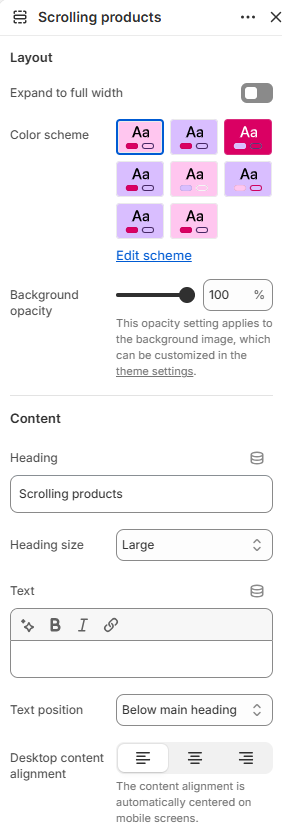
| Setting | Description |
| ------------------------- | ------------------------------------------------------------------------------------------------------------------------------------------- |
| Layout | |
| Expand to full width | Extends the section to the full browser width. |
| Color scheme | Sets the background and text colors. |
| Background opacity | Controls the background opacity. |
| Content | |
| Heading | Sets the section heading text. |
| Heading size | Controls the size of the heading. Choose from Small, Medium, or Large. |
| Text | Adds supporting text to the section. |
| Text position | Shows the text above or below the heading. |
| Desktop content alignment | Aligns the section content on desktop. Choose from Left, Center, or Right. On mobile, the content is automatically centered. |
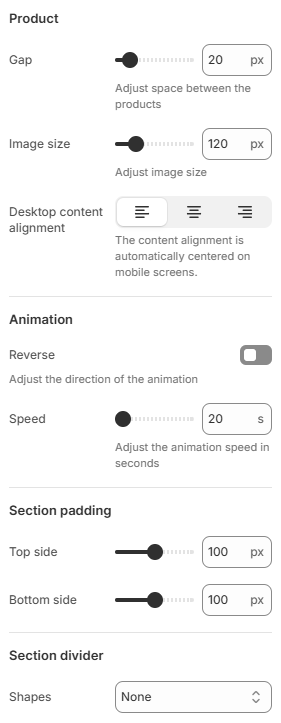
| Product | |
| Gap | Sets the space between product items. |
| Image size | Controls the size of the product image. |
| Desktop content alignment | Aligns the product content on desktop. Choose from Left, Center, or Right. On mobile, the content is automatically centered. |
| Animation | |
| Reverse | Reverses the scrolling direction of the animation. |
| Speed | Sets the scrolling animation speed in seconds. |
| Section padding | |
| Top side | Sets the space above the section. |
| Bottom side | Sets the space below the section. |
| Section divider | |
| Shapes | Adds a decorative divider to the section. Choose from Curve top, Curve bottom, Curve both, None, Border top, Border bottom, or Both border. |
## Blocks
Add blocks to this section in the theme editor. Each block is a separate item you can add, remove, and reorder.
### Product
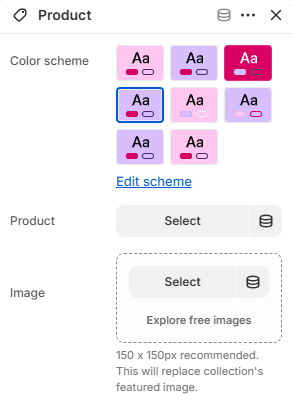
Displays a product in the scrolling product list.
| Setting | Description |
| ------------ | ----------------------------------------------------------------------------------------------------------------------------------------------------- |
| Color scheme | Sets the color scheme for this product item. |
| Product | Selects the product displayed in this block. |
| Image | Selects a custom image for the product. For best results, use an image with a resolution of 150 × 150 px. This replaces the product's featured image. |
***
## Common Questions
How do I change the scrolling direction?
Enable the **Reverse** option in the **Animation** settings to reverse the scrolling direction.
Can I replace the product image?
Yes. Select an image in the **Image** setting of the Product block to replace the product's featured image.
How do I change the scrolling speed?
Adjust the **Speed** setting under the **Animation** section to control how quickly the products scroll.